Identify visitors
See who a visitor is and the path they took, after they log in.
By default every visitor is anonymous. If your site has accounts, you can tell the script who someone is once they log in or sign up. From then on their visits are grouped into a profile with a full journey under Analytics → Visitors.
Send who it is
Call this after a log in or sign up, with your own user ID:
window.spintaxifyAnalytics('identify', {
  user_id: '42',
  name: 'Ann Lee',
  email: 'ann@example.com',
  plan: 'pro'
});
Only user_id is needed. name and email show in the list. Up to 10 more fields (like plan) are saved as details.
It is safe to call this before the script has loaded; the call waits and runs when it is ready.
On log out
window.spintaxifyAnalytics.reset();
This forgets the ID in that browser, so the next person on a shared computer is not mixed up.
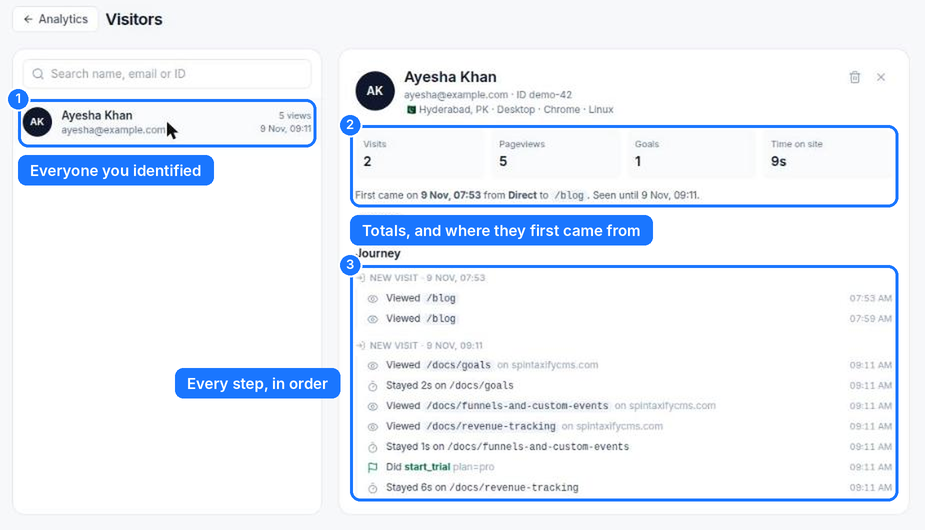
What you see
- Visitors lists everyone you identified, newest first, with search by name, email or ID.
- Click a person to see: where they first came from, each visit, every page, goals they hit, links they left by, and total time on site.
- Visits from the 24 hours before they logged in on the same device are linked too.
Privacy
Identifying people is your choice and happens only where you call it. Mention it in your privacy policy. You can delete a person from their profile (bin icon); their visits stay in your totals without their name.
From your server
Count a goal for a known person from your backend with the API:
curl -X POST https://spintaxifycms.com/api/v1/projects/YOUR-SITE-ID/analytics/events \
  -H "Authorization: Bearer YOUR-API-KEY" -H "Content-Type: application/json" \
  -d '{"name":"paid","user_id":"42","props":{"plan":"pro"}}'
Something missing? Contact us and tell us what you were looking for.