Google Search
Your Google clicks, searches and indexing, with what to do next. Connected to Google Search Console.
Google Search shows how your site does on Google, without opening Search Console.
Connect Google once
Open Topics & Calendar. At the top is the Google Search Console box: press Connect, choose the Google account that owns your site in Search Console, and allow access. Then pick your site from the list.
Pick the property that matches your website address exactly (for example https://www.yoursite.com/ or the domain property yoursite.com). If you pick another site, all numbers stay at zero.
The connection only reads data. It never changes anything in your Google account. Disconnect removes it.
What you see
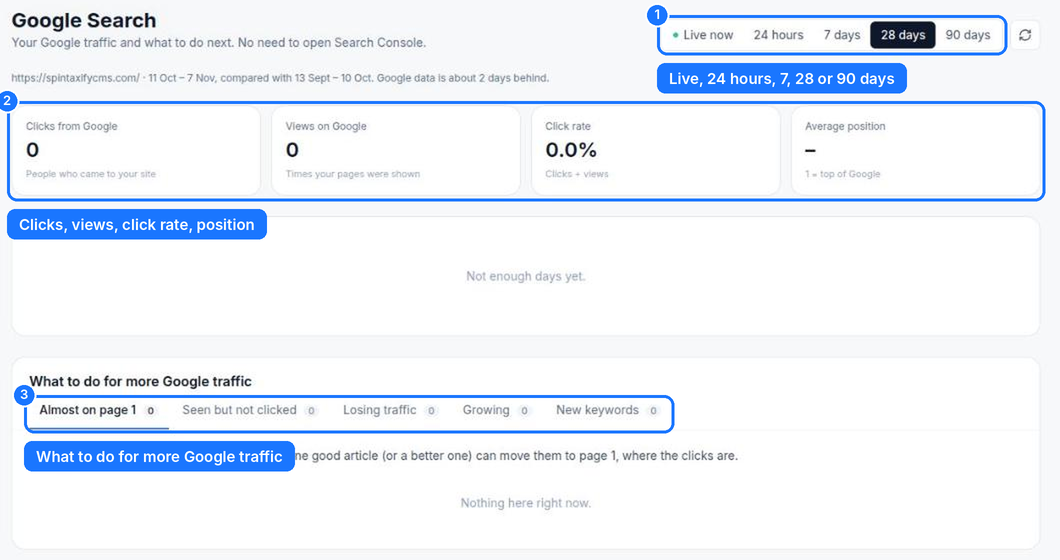
- Period — Live now and 24 hours (from your own visits), or 7, 28 or 90 days from Google. Google's numbers are about 2 days behind.
- The numbers — clicks from Google, views (how often your pages were shown), click rate and average position (1 is the top).
- What to do for more Google traffic — ready-made lists:
- Almost on page 1 — searches where you are at position 8 to 20. One good article can move them up.
- Seen but not clicked — shown often, rarely clicked: improve the title and description.
- Losing traffic and Growing — pages going down or up.
- New keywords — searches you started showing up for.
Below: every page and keyword with clicks, views, click rate and position.
Is Google showing your posts?
The indexing list checks every published post with Google: in Google, not in Google, or not checked yet. It checks by itself every day, and Check now checks straight away. New posts usually appear in 3 to 14 days.
Under Sitemaps, send your sitemap to Google once. After that, each time Autopilot publishes, Spintaxify asks Google to read it again, so new posts are found sooner.
Something missing? Contact us and tell us what you were looking for.