Guides
What Is Spintaxify CMS? Blog Analytics, Google Rankings and an AI Writer in One Place
Spintaxify CMS shows which blog posts bring visitors, Google rankings and revenue, then helps you grow the ones that work. A complete, plain guide to what it does, who it is for and what it costs.
Spintaxify CMS · 8 min read · November 2026
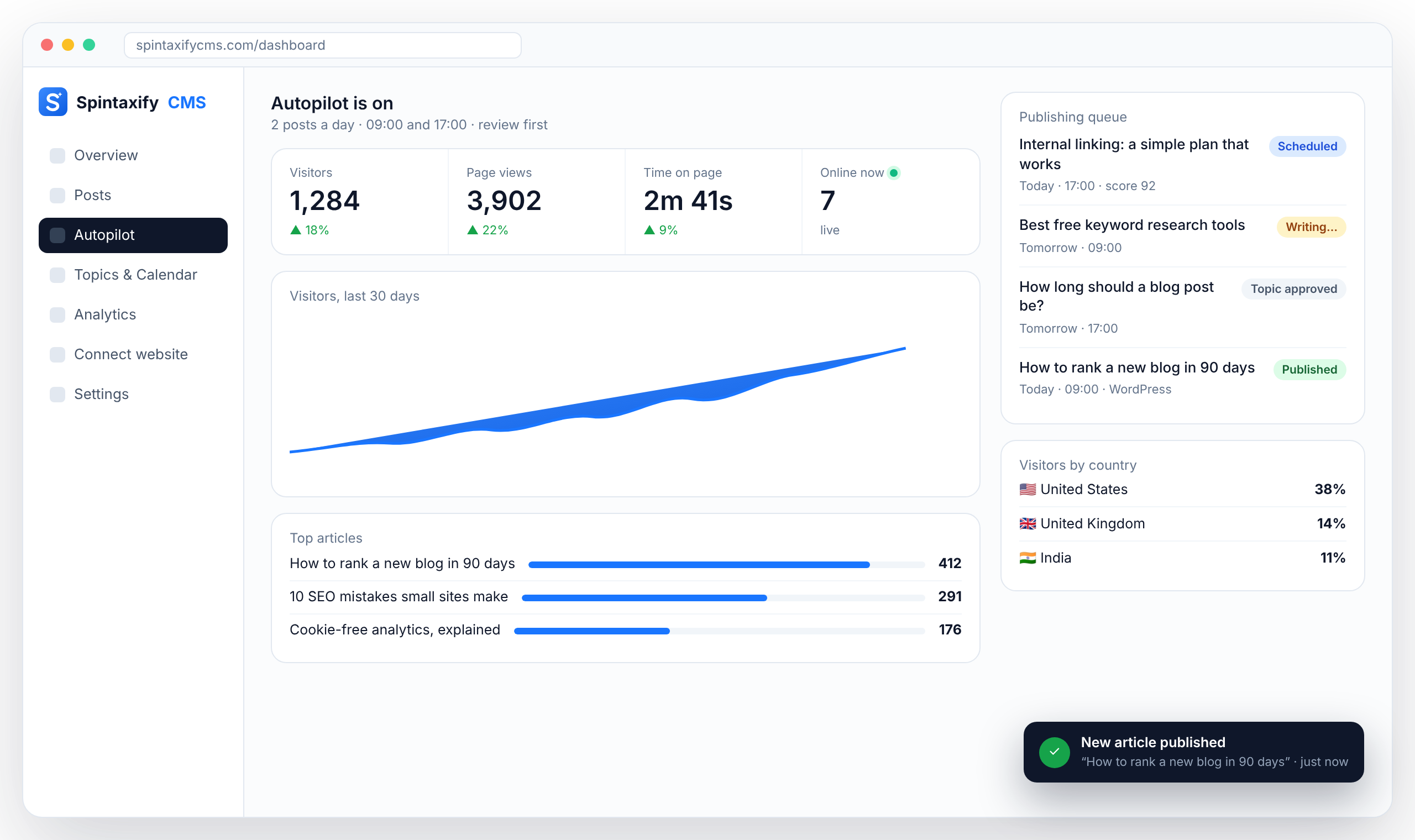
Spintaxify CMS is a blog platform for founders, small businesses and agencies. It answers one question most blogs cannot: which posts actually bring visitors, Google rankings and paying customers? It puts cookie-free analytics, Google Search Console data and revenue for every post in one dashboard, and then helps you write the next post with an AI writer. Autopilot can plan and publish on a schedule, but it is optional.
The problem it solves
Most blogs publish without knowing what works. Analytics sits in one tool, Google rankings in another, payments in a third, and nobody connects them to a single article. So teams keep writing the wrong things and stop after a few months. Spintaxify CMS connects the three, per post, so you can see which articles earn their place and which keywords are almost on page 1.
What Spintaxify CMS does
1. Cookie-free website analytics
One script line works on any website: WordPress, Shopify, Webflow, Framer, Wix or custom code. You see visitors, page views, bounce rate, time on page, sources and channels, UTM campaigns, countries, devices, goals, funnels, outbound clicks and scroll depth. It uses no cookies and stores no personal data, so no consent banner is needed for analytics. A live 3D globe shows who is on the site right now, and AI crawlers such as ChatGPT, Claude and Perplexity are counted separately from people.
2. Google Search Console inside the dashboard
Connect Google Search Console once and every article shows its clicks, impressions, average position and indexing status. Spintaxify CMS lists quick wins: keywords where you rank just outside page 1, and pages that are losing traffic.
3. Revenue attribution
Connect Stripe, Lemon Squeezy, Paddle or Polar and every payment is linked to the page and channel that first brought the buyer, including the landing URL and UTM tags. You see which articles bring customers, not only clicks.
4. AI writer
When you know which topic to write next, the AI writer researches it and drafts a complete SEO article: title, meta description, headings, FAQ, internal links, focus keyword and tags. You choose tone, length and language, and you can edit every draft before it goes live.
5. Autopilot (optional)
Pick days and times and Autopilot plans topics you have not covered yet. In Review First mode, drafts wait for your approval. Only if you choose Auto-Publish do they go live by themselves. Each topic is checked against your existing posts so the same subject is not covered twice.
6. Publish anywhere
Use the hosted blog, show the blog inside any website with one script line, or publish directly to WordPress, Ghost, Webflow, Shopify or a webhook. A REST API, an MCP server for AI assistants and a command line tool are included.
7. Reports and alerts
A weekly email report shows top pages, sources and suggested next steps. Alerts tell you the moment a goal happens, such as a signup or a purchase, or when traffic changes.
Who it is for
Founders and small businesses who want to know which blog posts bring traffic and customers, and grow them. SEO agencies and freelancers who run blogs for several clients. Content and marketing teams who want articles, rankings and analytics in one place. And anyone who only wants privacy-friendly, cookie-free website analytics.
How it works in practice
Step 1: add your website. Paste one script line and connect Google Search Console. Setup takes about two minutes. Step 2: see what works. Within days you see which posts bring visitors, rankings and sales, and which keywords are close to page 1. Step 3: grow it. Improve the posts that almost rank, write the next article with the AI writer, or let Autopilot keep a steady schedule.
Pricing
There is a 7-day free trial with every feature open and 5 AI articles, and no card is needed. Starter costs $19 a month for 1 website and 30 AI articles a month. Pro costs $49 a month for 3 websites and 90 AI articles a month. Agency costs $129 a month for 10 websites and 300 AI articles a month. Prices are in US dollars, billed monthly, and you can cancel any time.
How it compares
For analytics, people often compare Spintaxify CMS with Plausible, Fathom or DataFast: like them it is cookie-free, and it adds Google Search Console data and revenue for every article. For AI writing, people compare it with Jasper, Koala or SEOWriting.ai: those tools write articles, while Spintaxify CMS also shows which articles work after they are published. The difference is that writing, publishing, rankings and revenue live in one place.
In short
Spintaxify CMS is the place to see which blog posts bring traffic, Google rankings and revenue, and to grow the ones that work. The AI writer and Autopilot help you publish more, but the core is knowing what works. You can try it free for 7 days at spintaxifycms.com.
Frequently asked questions
What is Spintaxify CMS?
Spintaxify CMS is a blog platform that shows which blog posts bring visitors, Google rankings and revenue, in one cookie-free dashboard with Google Search Console built in, and helps you write the next posts with an AI writer and optional Autopilot.
Is Spintaxify CMS just an AI content tool?
No. Its core is analytics, Google rankings and revenue per post. The AI writer and Autopilot are there to help you grow the posts that work, and every draft can be reviewed before it goes live.
How much does Spintaxify CMS cost?
7-day free trial with 5 AI articles and no card. Starter $19/month (1 website, 30 articles), Pro $49/month (3 websites, 90 articles), Agency $129/month (10 websites, 300 articles). Cancel any time.
Does it work with my website?
Yes. One script line works on any website, including WordPress, Shopify, Webflow, Framer, Wix and custom code. You can also publish directly to WordPress, Ghost, Webflow, Shopify or a webhook.
Does it need a cookie banner?
Not for analytics. It uses no cookies and stores no personal data.
Can I use only the analytics?
Yes. Add the script line and use visitors, goals, funnels, Google Search Console and revenue without writing articles.
See which posts bring traffic, rankings and revenue
Analytics, Google Search Console and revenue for every post, plus an AI writer for the next one. 7-day free trial, no card needed.
Start free

